


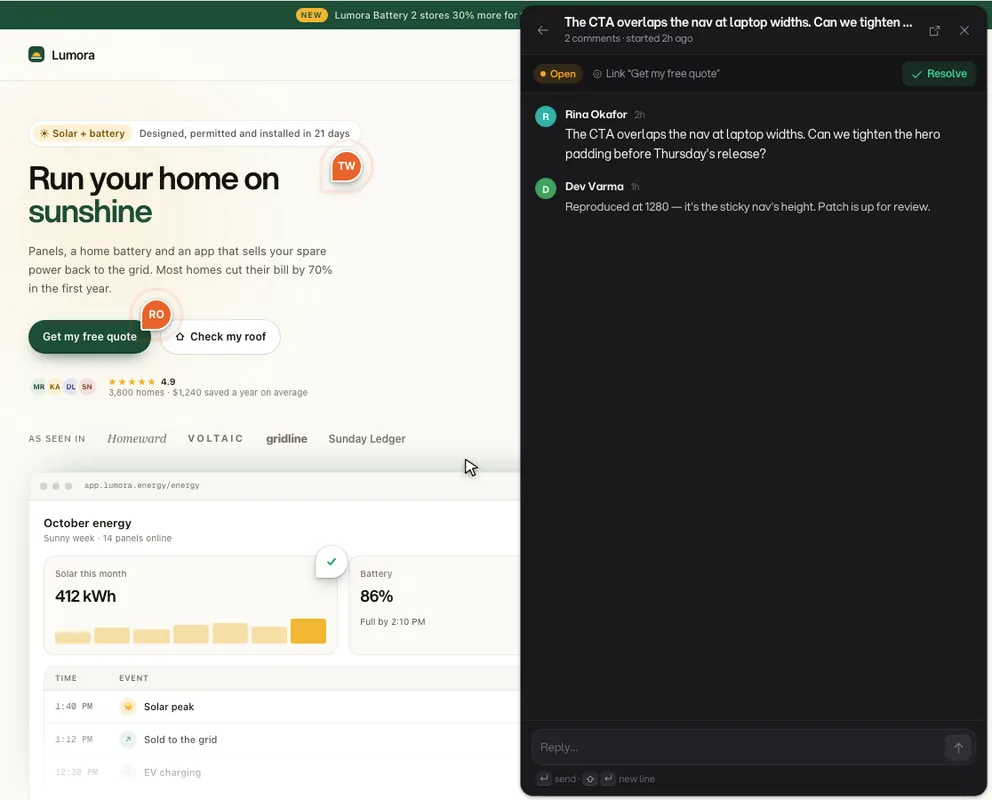
Leave feedback directlyon your live product

Pin comments to any element. Auto-capture browser context. AI-triage, assign, and resolve — without leaving a single tab.

No screenshot attachments. No Slack threads. No guessing.

AI-powered triageProduction, preview & localhostSetup in under 10 minutes

Install once.
Capture feedback everywhere.

Annot8 drops into your existing stack with minimal config. Start collecting actionable, element-level feedback across staging and production in the same day.

1

Create a project

Generate your unique Project ID in the dashboard

2

Paste the snippet

Add to <head> or <body> — works with any framework

3

Allowlist your domain

Localhost, staging, or production URLs

Any frameworkShadow DOM isolatedUnder 10 minutes
index.html
1<!-- Annot8 Widget -->
2<script
3src="https://beta.annot8.app/widget.js"
4data-project-id="YOUR_PROJECT_ID"
5async
6></script>
ReadyHTML
Ln 6, Col 10
ProductionPreviewLocalhost

Built for your whole team

Everyone ships better when feedback stays in context. Annot8 gives each role exactly what they need.

Product

Triage with full context, not just a description

Triage — Inbox3 open
CTA copy feels generic/pricing
2m
J
Nav overlaps hero on mobile/home
18m
K
Footer link returns 404/about
1h
  • AI-suggested priorities on every thread
  • Inbox view with status, assignee, and labels
  • Resolution tracking across releases

Design

Annotate the live component, not a screenshot of it

Pin Previewnav.site-header
1

Font-size should be 14px per spec, currently 16px

  • Click any element to pin a thread to it
  • Threads survive redesigns via selector fallback
  • Figma integration for design-to-live comparison

QA

Every bug report is already complete before you read it

Bug Report Context Auto
browserChrome 122.0.6261
osmacOS 14.3.1
viewport1440 × 900 @2x
url/pricing#cta
consoleTypeError: null is not an object
  • Auto-captures browser, OS, viewport, and URL
  • Console errors and network traces included
  • Structured steps-to-reproduce every time

Engineering

Full reproduction context before you write a line

Element ContextDOM path
main > section.pricing > div.card:nth-child(2) > button.cta
LCP 1.2sCLS 0.02FID 45ms
  • CSS selector trail to the exact element
  • Performance snapshot with LCP, CLS metrics
  • Thread-to-PR linking for full traceability

Everything you need to ship clean releases

Capture visual feedback, route it to the right owner, and verify fixes in context. No tab juggling, no missing details, no guesswork.

app.annot8.io/acme-corp/threads

Hero value prop feels unclear on /pricing

Open·High·/pricing·Preview env
J
K
J
Jamie Lin3m ago

Value prop should mention "approval workflow" for enterprise buyers. The current headline is too generic.

Pinned tosection.hero-copy
AI Suggestion

Similar thread exists on /features — consider grouping for a copy sprint.

Y
Write a reply...

Pin to any element

Click any live element to drop targeted feedback. Comments stay attached through deploys, responsive shifts, and design iterations.

Get Started
1
button.cta-primaryx: 420 · y: 680

Auto-capture context

Every comment includes browser, viewport, OS, URL, and selector trail. You get complete reproduction context by default.

Captured context
browserChrome 122.0
viewport1440 × 900
route/pricing
selector#cta > button
osmacOS 14.3
All data auto-captured

Resolve & track

Move issues from open to verified with threaded history and clear ownership. Every decision stays discoverable for future releases.

Resolution flow4/5 complete
Comment pinned to element10:31
Team notified via Slack10:31
Fix deployed to staging11:48
Thread resolved14:02
Production verified
AI Analysis
Processing
J
CTA copy feels too generic on /pricing
/pricing — section.hero-copy
CopyHigh3 duplicates
AI Summary

Multiple reviewers flagged that the “Get started” CTA lacks brand voice and urgency. Same pattern observed on /features, /pricing, and /home. Recommend a copy sprint targeting conversion-critical pages.

Related threads
/featuresHero CTA needs urgency92%
/homeGet started button feels generic87%
/pricingCTA should reflect trial offer84%

AI handles
the grunt work

Annot8's AI layer runs automatically on every thread — no prompting, no setup. Just faster triage and less noise for your whole team.

Auto-categorize

Every thread is labeled Bug, Copy, Design, or Feature on creation

Priority suggestions

AI reads content and history to recommend urgency before you open the thread

Duplicate detection

Surfaces similar threads across pages so you fix root causes, not symptoms

One-click summaries

Collapse long discussions into a single context-preserving summary

Draft replies

Generate an on-brand response ready to send or edit in seconds

From comment to release,
in one continuous flow

Annot8 keeps product intent, implementation details, and release verification connected. Teams can close loops faster with fewer meetings and less context loss.

Assign feedback directly to owners and squads

Sync threads into existing issue trackers

Track status by environment and release

Verify fixes with side-by-side context

Feedback Pipeline
Active
01

Capture

3 threads today

Pin feedback to the exact UI element with browser and viewport metadata.

02

Route

Auto-assigned

Convert threads into prioritized work and sync to your delivery tools.

03

Resolve

In progress

Collaborate in-thread, mark complete, and preserve decision history.

04

Verify

Waiting

Confirm fixes on target environments before release goes live.

Automate the
repetitive parts

Build rules that route, assign, and notify the moment feedback arrives. Stop manually triaging every thread — let the workflow run itself.

Route by URL, issue type, priority, or label

Auto-assign to owners or squads

Notify Slack, email, or webhook on any trigger

Sync critical threads to Jira or Linear automatically

Automation Rules
3 active
Rule 1
WhenThread created
IfURL contains /design
Then
Assign → @design-team
Notify #design-review
Rule 2
WhenPriority = Critical
IfAny page
Then
Notify → @eng-lead
Create Jira ticket
Rule 3
WhenStatus = Resolved
IfLabel: needs-verify
Then
Request verification
Reopen if no confirm in 48h
Teams lose6 hours/weekon unclear feedback

71%

Less status meetings

4.8/5

Reviewer satisfaction

2.4×

Faster release approvals

Every thread becomes
team knowledge

Resolved threads stay attached to their elements. New team members see the full history of decisions, not just the current state.

Persistent context

Comments survive deploys and layout changes

Searchable history

Find past decisions by page, element, or keyword

Team-wide visibility

Everyone sees what was discussed and why

Thread Historybutton.cta-primary
3 threads on this element2 resolved
A
Ava KimJan 15Resolved

Padding looks off on mobile here — should be 24px not 16px

Fixed in v2.4.1
M
Max LarsenJan 22Resolved

Font weight should be 600 per design spec, currently rendering as 400

Updated in PR #342
J
Jamie LinTodayOpen

CTA copy needs to match updated brand guide — see Figma comments

Plugs into your workflow

Annot8 connects to the tools your team already uses, so feedback flows into your existing process. Keep context where feedback starts, and execution where delivery happens.

Slack

Get notified on new threads

Jira

Create tickets from comments

Linear

Sync issues automatically

GitHub

Link threads to PRs

GitLab

Attach to merge requests

Figma

Compare design vs live

Notion

Export threads as docs

Vercel

Preview deploy comments

Asana

Create tasks from feedback

Discord

Team alerts in channels

Teams

Notify Microsoft Teams

Trello

Push threads to boards

Slack, Jira, Linear, GitHub, Discord, Teams, Asana, Trello, and more — plus webhooks and a full API

Understand what's breaking
before users report it

Insights aggregate feedback patterns across your product so you can spot recurring issues, measure resolution speed, and prioritize with real data.

Top pages by feedback volume

See which pages generate the most threads across all environments

Resolution time trends

Track how fast your team closes the loop, release over release

First-response rate

Know when feedback is going unacknowledged before it becomes a blocker

Faster issue clarity

83%

Fewer screenshot bugs

2 min

Install to first thread

Project Insights
Last 30 days
Threads
65+12%
Avg resolve
4.2h-18%
First response
8m-31%
Threads by day
Mar 9Mar 29
Top pages
1/pricing
24+8
2/features
18+3
3/onboarding
14-2
4/dashboard
9+1

Teams shipping with less noise

From product to QA to engineering — Annot8 fits into every role's workflow.

Cut our design review cycles in half. Context survives deploys — the selector fallback actually works.

A

Alex Chen

Product Manager · Storyblok

I can pin a note to the exact broken button, not describe it in a Slack thread and hope someone understands.

S

Sarah Mills

Senior Designer · Vercel

Every bug report includes browser, OS, viewport, selector, and console errors. We ship faster because we stop asking follow-up questions.

M

Marcus Torres

QA Lead · Linear

Frequently asked questions

Everything your product, design, and engineering teams usually ask before rolling out a new feedback workflow.

Can we use Annot8 on production without exposing internal notes?

Yes. Projects are private by default, with invite-only access, role controls, and environment-level visibility so external users never see internal conversations.

Does Annot8 replace Jira, Linear, or GitHub issues?

Not at all. Annot8 handles in-context capture and discussion, then syncs actionable threads into your existing planning and engineering workflow.

Will comments break when we ship new versions?

Anchors are element-aware and include selector paths plus fallback positioning. Threads remain stable through most layout and release changes.

How quickly can a team get started?

Most teams install Annot8, connect one project, and create their first structured feedback thread in under 10 minutes.

Turn feedback into momentum.
Ship confidently, every week.

Free for up to 3 projects. No credit card required.