
PRODUCT ANALYTICS
Product analytics: know whether the fix mattered
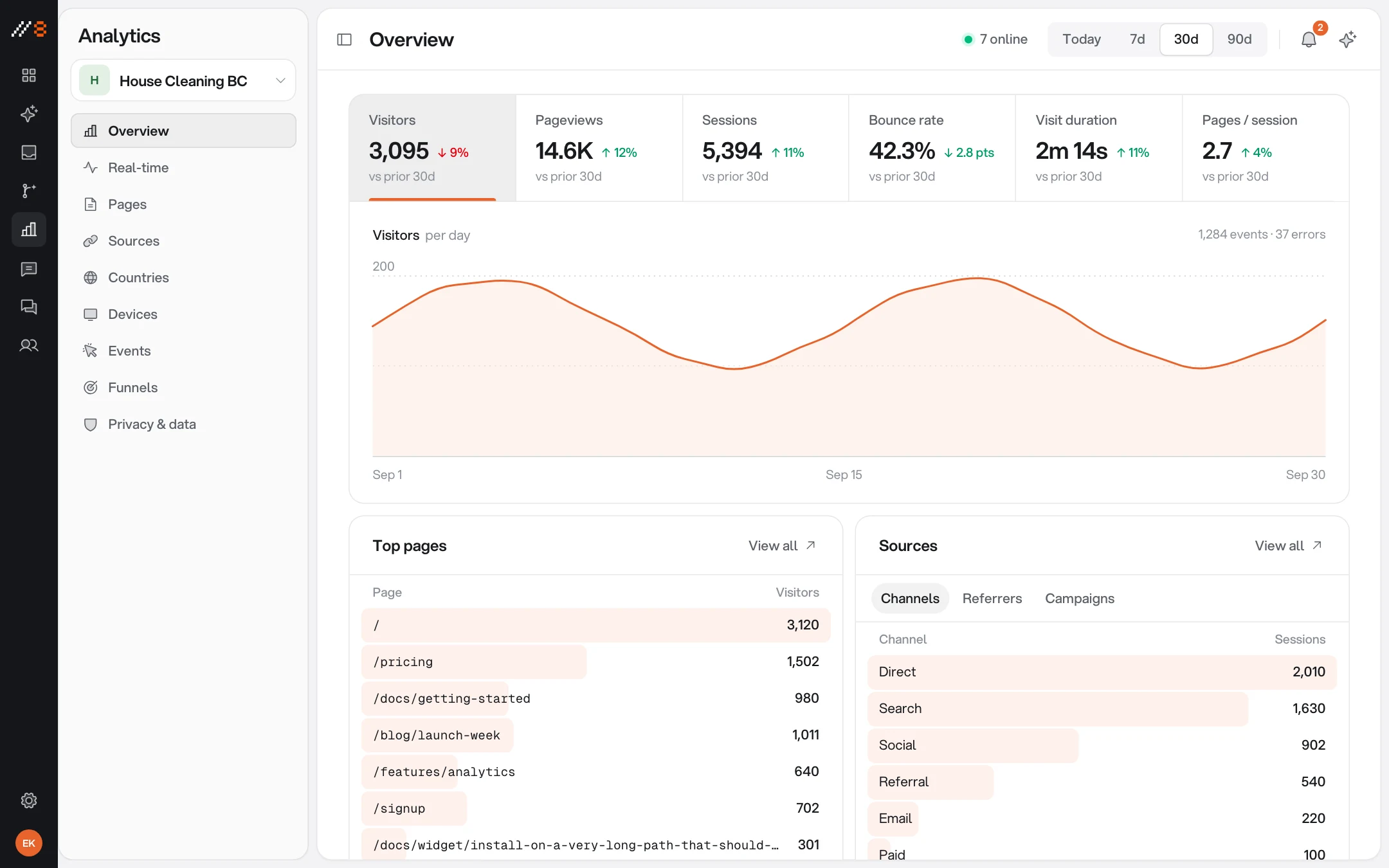
The same script that collects feedback measures the page — visitors, sources, funnels, events, and a real-time view — so you can see what changed after you shipped, without bolting a second tag onto the site.
INCLUDED
The numbers, in one place
Enough to answer the questions a product team actually asks — attached to the site the feedback comes from.
The overview
Unique visitors, sessions, pageviews, average session length, and bounce rate, with the trend over time.
Where they came from
Traffic sources and referrers, so a spike has an explanation.
What they used
Devices, browsers, and operating systems — the same context your feedback threads carry.
Top pages
Which pages carry the traffic, and which carry the complaints.
Funnels
Define the path you care about and watch where it leaks.
Custom events and real-time
Track the interactions you name, and watch the site live while a release goes out.
ONE SCRIPT
Measurement without a second tag
Analytics ships inside the widget that is already on the page. No extra script and no second vendor on your site — and it only measures once your page passes the visitor's consent.
Feedback and numbers, together
The thread says what broke; the chart says how many people it touched. Both live in the same project.
Per-environment lanes
Development, staging, and production stay separate on the same project key — your test traffic never muddies the chart.
Resolution insight
Median and p90 first-response and time-to-resolve per project, so you can see triage getting faster.
PUT IT INTO PRACTICE
Make your next review easier to act on
Use these guides to plan a review, capture clear evidence, and check the result before release.
Visual feedback starts on Free with three guest reviewers. Paid plans add screen recording, integrations, live chat, and analytics. Analytics also requires project enablement and visitor consent.
Website Feedback Widgets: Choose, Install and Test
Choose a website feedback widget for forms, visual comments, or feature requests. Follow an installation, privacy, and end-to-end review checklist.
WordPress Website Feedback: Widget Setup & Client Review
Add a WordPress feedback widget, configure staging hosts, review page templates as a client, and verify revisions before website sign-off.
Webflow Website Feedback: Staging Reviews & Widget Setup
Install a Webflow feedback widget with site-wide custom code. Review published CMS pages, responsive layouts, and client revisions on the right host.
Next.js Feedback Widget: React & App Router Setup
Add a Next.js feedback widget through the shared layout. Configure preview hosts, test React navigation, and collect reproducible website bug reports.
Website Design Feedback Checklist
Review website design with a practical checklist for hierarchy, real content, responsive layouts, interaction states, and clear feedback.
Website Launch Checklist: From QA to Release
Use a website launch checklist for production settings, redirects, indexability, forms, monitoring, and rollback, with a downloadable worksheet.
Client Website Review Template & Approval Worksheet
Give clients a website review worksheet for factual copy corrections, visitor tasks, design decisions, and scoped approval. Download the free template.
Visual Bug Reporting: A Practical Evidence Guide
Learn how to report visual website bugs with viewport context, design references, focused screenshots, and verification across nearby states.
Screenshots vs Screen Recordings for Website Feedback
Choose screenshots or screen recordings for website feedback using practical examples, a capture plan, and guidance on browser and privacy limitations.
Website Bug Report Template: A Clear Example and Checklist
Use a free website bug report template with reproduction steps, expected and actual results, browser context, and a worked checkout example.
How to Collect Website Feedback Without Losing the Context
Build a website feedback process for client reviews: scope each round, collect actionable comments, triage decisions, and verify changes before sign-off.
Website UAT Checklist: Test Real Journeys Before Launch
A practical website user acceptance testing checklist with example test cases, mobile and keyboard checks, a downloadable CSV, and clear release criteria.
ONE WORKSPACE
It comes with the other three
Every surface shares the same inbox, the same team, and the same project key. Turning one on never means installing another.
PUT IT TO WORK
Choose a practical workflow
Start with a review process your team can follow, then adapt the checklist to the release.
Website feedback for SaaS product teams
Connect SaaS release reviews to useful visual bug reports, product decisions, and issue-tracker handoffs without losing the original page context.
Visual feedback for ecommerce website reviews
Review ecommerce storefronts with clear visual feedback for product pages, carts, responsive layouts, and safe checks of the purchase journey.
Free review templates
Download editable bug reports, client review requests, and launch checklists, with examples that show what to include.

Ship, then know
The chart that tells you whether the fix mattered comes from the script you already installed.
Free forever plan · No credit card · 3 guest reviewers included