
FEEDBACK PORTAL
A public feedback board your users can vote on
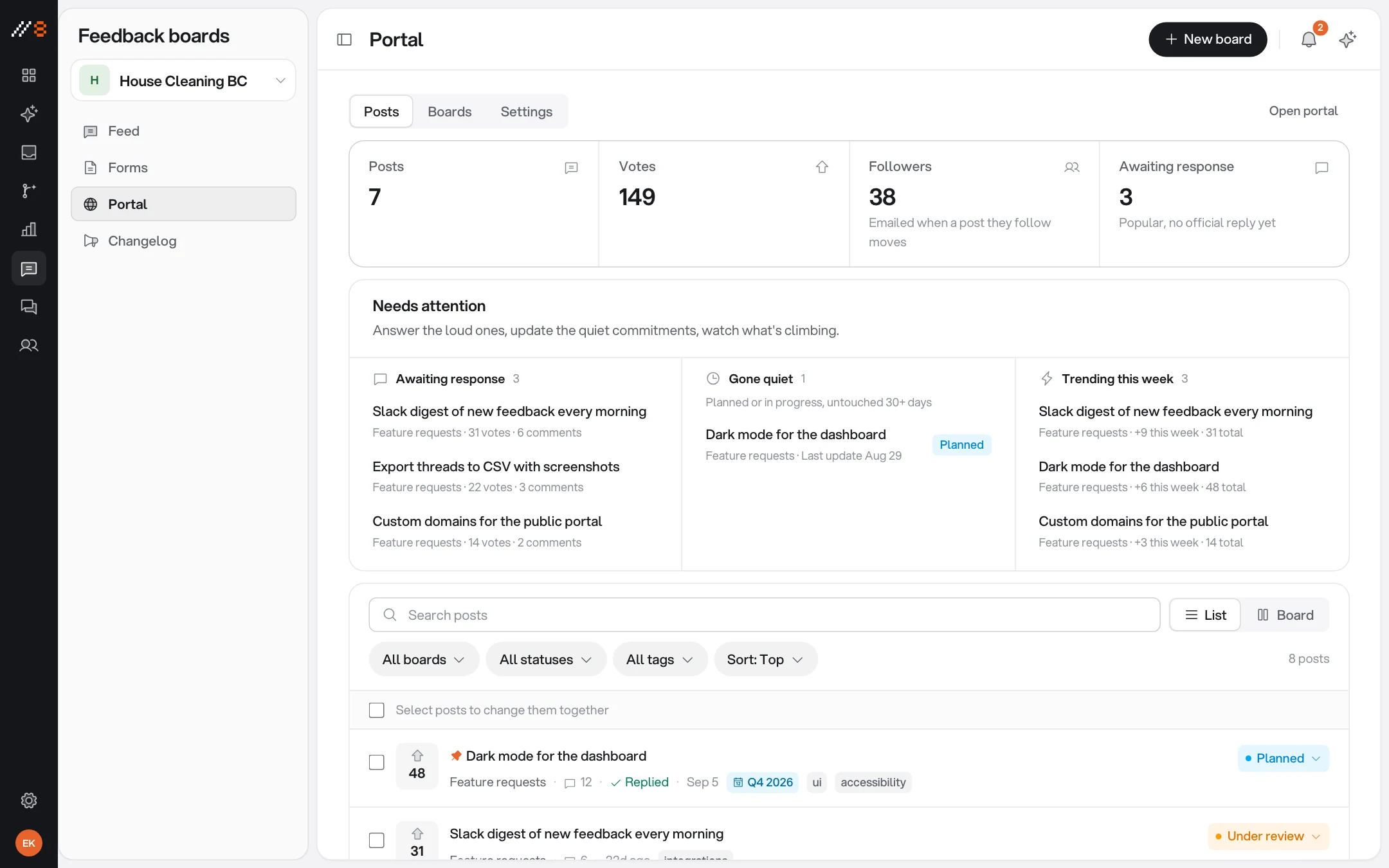
Users post ideas, upvote what matters, and watch the roadmap move — open, under review, planned, in progress. You learn what to build from the people who will use it.
INCLUDED
What the portal ships with
Hosted by us, branded as yours, and wired into the same inbox as everything else.
Hosted and ready
Your portal gets its own link, www.annot8.app/p/<your-portal-link>, the moment you turn it on — nothing to deploy.
Boards you define
Feature requests, bugs, integrations — organise posts into the boards that match how your team thinks.
Voting that ranks the pile
Users upvote what matters to them, so the top of the board is your demand signal, not your loudest customer.
A roadmap people can watch
Posts move through open, under review, planned, and in progress — expectations managed without writing a status update.
Moderation and triage
Review, merge, and manage posts from the dashboard before and after they appear publicly.
Links and questionnaires
Shareable feedback links and questionnaires for the questions a board does not answer on its own.
FROM VOTES TO SHIPPED
The board feeds the same pipeline
A portal post is a thread like any other: it can be labelled, assigned, automated on, and pushed to your tracker with its context attached.
Into the tracker
Commit to a request and push it into Linear or GitHub with the original post and votes behind it.
Automations apply
The same rules that label and route pinned feedback run on portal posts the moment they arrive.
Close the loop
When the status moves, the board shows it — the people who asked can see it happened without being emailed one by one.
PUT IT INTO PRACTICE
Make your next review easier to act on
Use these guides to plan a review, capture clear evidence, and check the result before release.
Visual feedback starts on Free with three guest reviewers. Paid plans add screen recording, integrations, live chat, and analytics. Analytics also requires project enablement and visitor consent.
Website Feedback Widgets: Choose, Install and Test
Choose a website feedback widget for forms, visual comments, or feature requests. Follow an installation, privacy, and end-to-end review checklist.
WordPress Website Feedback: Widget Setup & Client Review
Add a WordPress feedback widget, configure staging hosts, review page templates as a client, and verify revisions before website sign-off.
Webflow Website Feedback: Staging Reviews & Widget Setup
Install a Webflow feedback widget with site-wide custom code. Review published CMS pages, responsive layouts, and client revisions on the right host.
Next.js Feedback Widget: React & App Router Setup
Add a Next.js feedback widget through the shared layout. Configure preview hosts, test React navigation, and collect reproducible website bug reports.
Website Design Feedback Checklist
Review website design with a practical checklist for hierarchy, real content, responsive layouts, interaction states, and clear feedback.
Website Launch Checklist: From QA to Release
Use a website launch checklist for production settings, redirects, indexability, forms, monitoring, and rollback, with a downloadable worksheet.
Client Website Review Template & Approval Worksheet
Give clients a website review worksheet for factual copy corrections, visitor tasks, design decisions, and scoped approval. Download the free template.
Visual Bug Reporting: A Practical Evidence Guide
Learn how to report visual website bugs with viewport context, design references, focused screenshots, and verification across nearby states.
Screenshots vs Screen Recordings for Website Feedback
Choose screenshots or screen recordings for website feedback using practical examples, a capture plan, and guidance on browser and privacy limitations.
Website Bug Report Template: A Clear Example and Checklist
Use a free website bug report template with reproduction steps, expected and actual results, browser context, and a worked checkout example.
How to Collect Website Feedback Without Losing the Context
Build a website feedback process for client reviews: scope each round, collect actionable comments, triage decisions, and verify changes before sign-off.
Website UAT Checklist: Test Real Journeys Before Launch
A practical website user acceptance testing checklist with example test cases, mobile and keyboard checks, a downloadable CSV, and clear release criteria.
ONE WORKSPACE
It comes with the other three
Every surface shares the same inbox, the same team, and the same project key. Turning one on never means installing another.
PUT IT TO WORK
Choose a practical workflow
Start with a review process your team can follow, then adapt the checklist to the release.
Website feedback for SaaS product teams
Connect SaaS release reviews to useful visual bug reports, product decisions, and issue-tracker handoffs without losing the original page context.
Collect clear client feedback on a website
Help clients review the working website with useful pinned comments, focused review requests, and clear decisions before the next revision.
Free review templates
Download editable bug reports, client review requests, and launch checklists, with examples that show what to include.

Let demand rank itself
Turn the portal on and your users start telling you what to build next — in the open.
Free forever plan · No credit card · 3 guest reviewers included